Skip to content
v0.19.0Performance release: ~30% less memory with 10 tabs, half the user data, smaller package
MCP · 99 TOOLS · 0.19.0

The browser you are alreadysigned in to. Your agent drives.Already signed in,your agent drives.

One login per environment. The agent clicks, fills, waits and extracts in that same window; you can take over whenever you want. Windows, macOS and Linux, all local.

Local MCP · 127.0.0.122 workflow nodesGeetest v4 slidersUnsigned installers
BrowserPilot · real run · window 1280 × 800

A real task: answering a general-knowledge exam on Wenjuanxing, five questions, all correct, 100 points. The recording starts on a blank paper, picks each answer, and ends on the result page.

13 seconds · silent loop · recorded
01 InputA real online exam; the agent reads each question and decides the answer.
02 Actions in the windowAnswering question by question; the window, page and recording marks are real.
03 ResultSubmit and the score appears: 5 / 5 correct, 100 points.
  • 99MCP toolsactual count in tool-catalog.ts
  • 22workflow nodesstart, end, branch and loop included
  • 200runs keptthe UI lists the latest 50
  • 3concurrency and headlessdefault 3 each, adjustable in settings
01How it works

Give the task, then read the result

Once a run works, save the steps as a workflow. Next time a single workflow_run replays it.

BrowserPilot
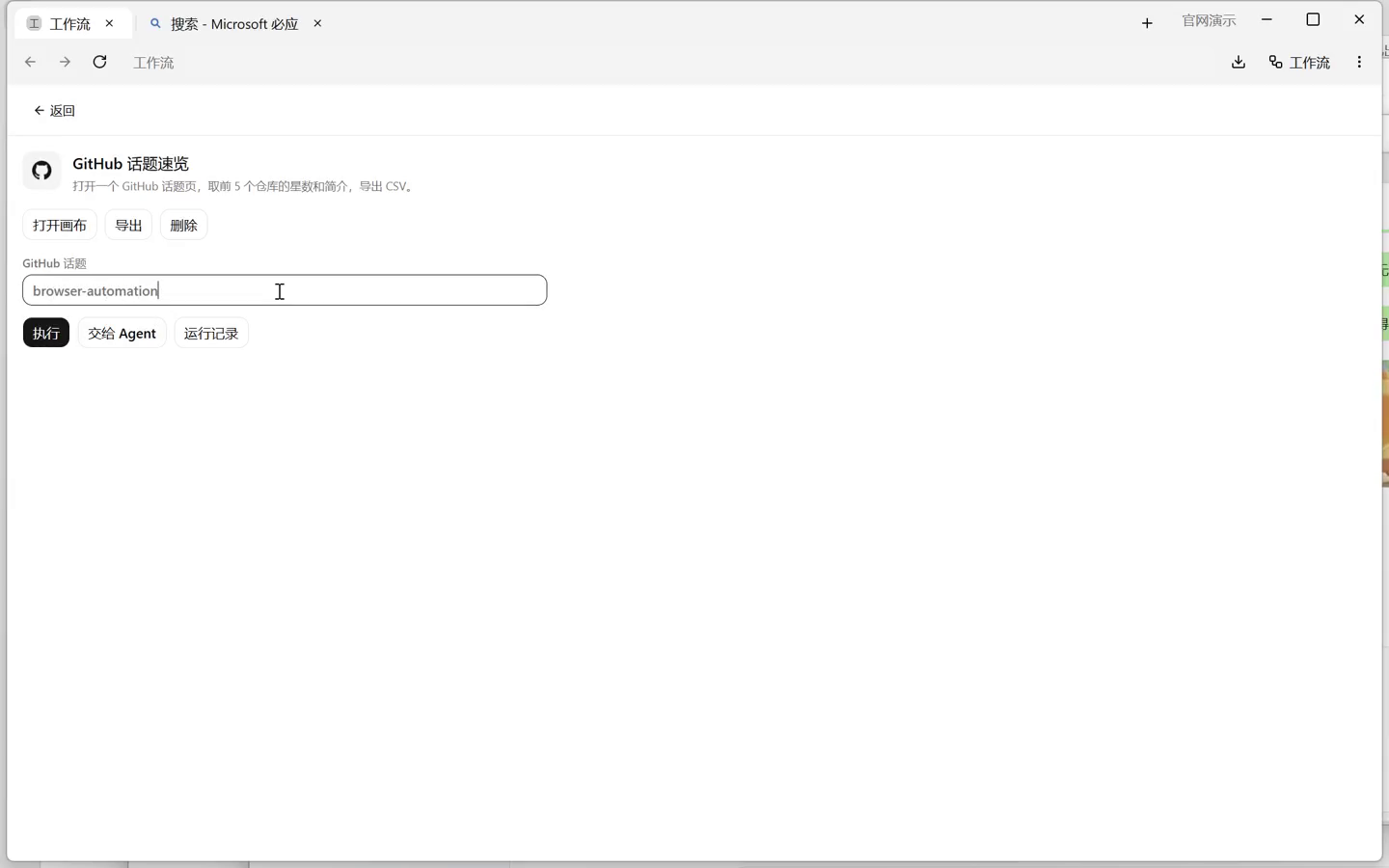
Filling in workflow parameters inside BrowserPilot

01Describe the task, or fill in parameters

Say it in Claude Code, Kimi Code or Cursor. The agent calls tools over local MCP. Once a run works, save it as a workflow and replay it with new parameters.

BrowserPilot
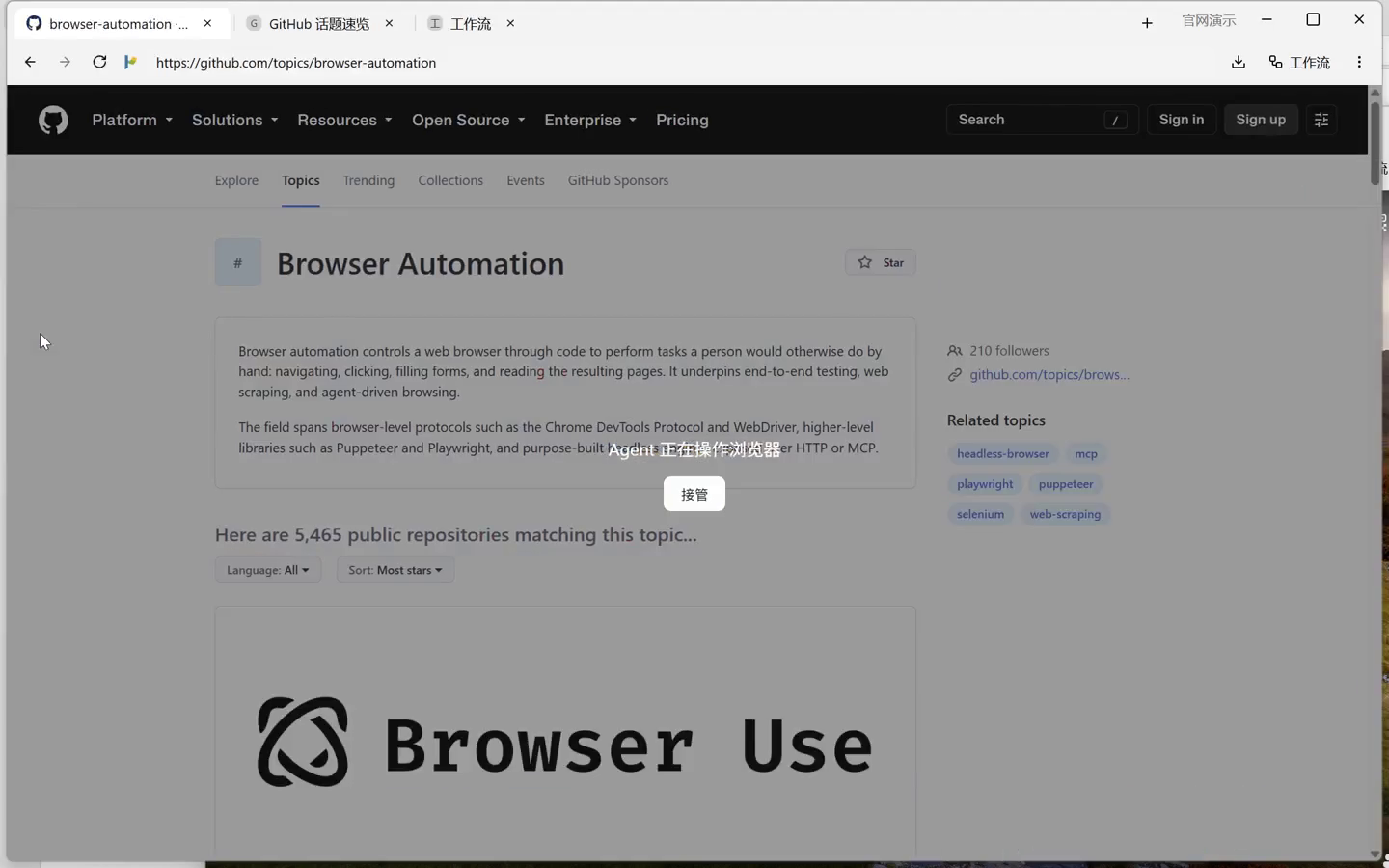
An overlay saying the agent is operating the browser, with a take-over button

02The agent works in the same window

Open the page, find elements, wait for rendering, click and type. An overlay marks that the agent is driving; press Take over to take it back.

BrowserPilot
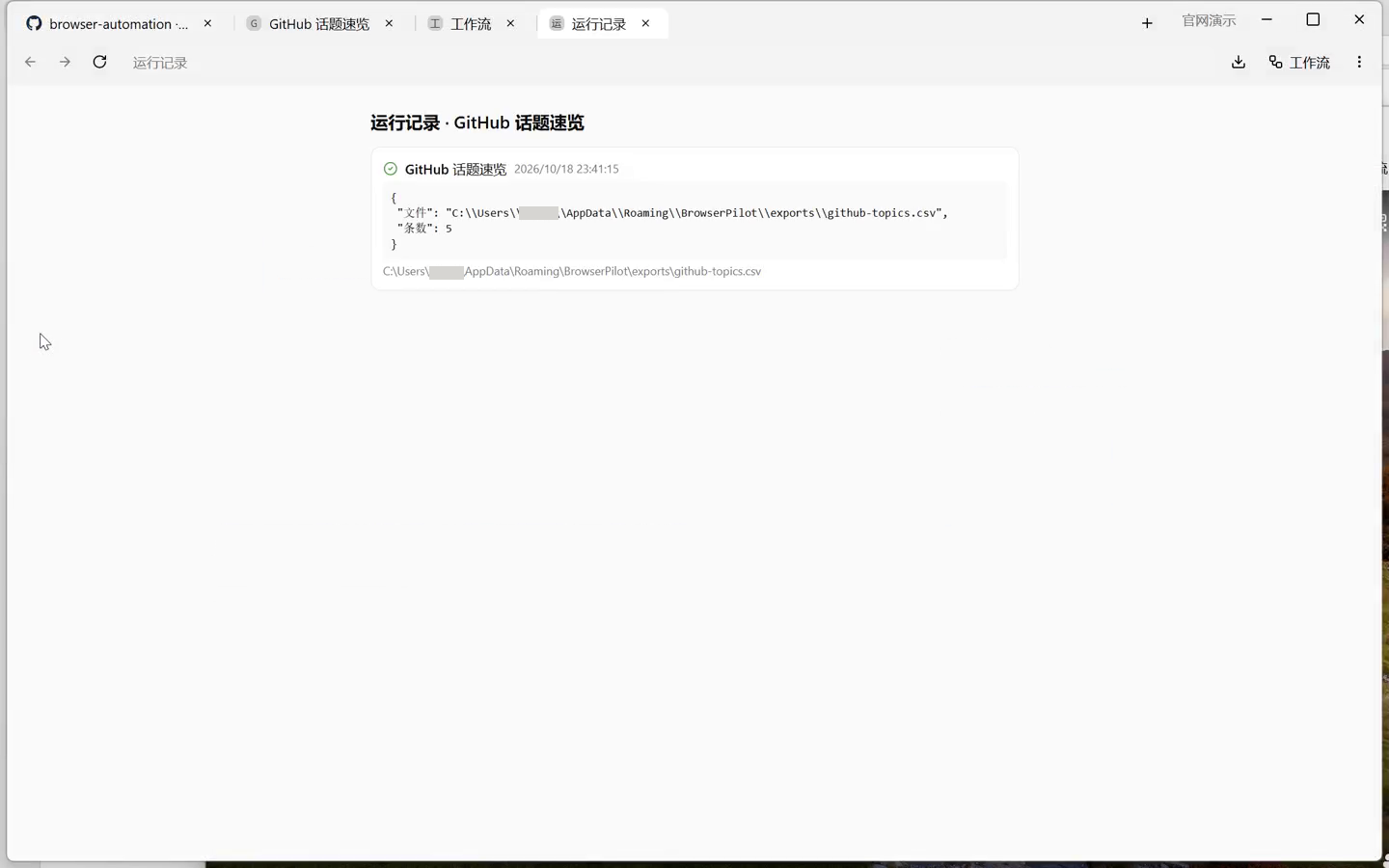
Run detail page showing outputs, row counts and a CSV path

03See the result, decide whether to keep it

Every run records success or failure, the step it stopped at, outputs and files. Turn a working run into a workflow and one workflow_run replays the whole graph.

02Capabilities

What it does, what it does not

Every line maps to an MCP tool or a shipped interface behaviour. Supported means available today; experimental means implemented but dependent on external conditions; not supported means no promise, hand it to a human.

Navigation and locating

Find the element before clicking. If it cannot be found, fail instead of guessing.

  • Open, back, forward, reload。addresses are normalised; plain text uses the current search engine. page_navigateSupported
  • XPath or CSS selectors。click, type and select must match exactly one element; several matches fail instead of picking the first. page_clickSupported
  • Piercing shadow DOM and iframes。pierce searches same-origin iframes and falls back to cross-origin ones (OOPIF). page_querySupported
  • Canvas and coordinate clicks。when there is no stable node, click by viewport or screenshot coordinates; page_inspect reports what is under a point. page_click / page_inspectSupported

Forms and uploads

Typing, selecting and uploading all go through real input.

  • Typing and shortcuts。trusted CDP input by default; non-Latin text uses Input.insertText. page_type / page_keySupported
  • Select, paste, upload files。uploads go straight to the file input, without the system picker. page_select / page_uploadSupported
  • Precise drags。sliders and sorting; the track has acceleration, jitter and slight overshoot. page_dragSupported

Tabs and environments

Logins stay in the environment, not in the conversation.

  • One window per environment。several sites share one login inside an environment; environments never see each other. env_create / env_openSupported
  • Closing keeps logins。state lives in the Electron persist partition; only deleting the environment clears cookies. env_deleteSupported
  • Globally unique tab ids。open, close, activate, group; agents address tabs by id and closed ids are not reused. tab_* / group_*Supported
  • Headless only hides the window。same Chromium, not a second headless engine; 3 windows by default. env_openSupported

Waiting and retries

No fixed sleeps. Wait for the element, then continue.

  • Wait for appear or disappear。10 seconds by default, 60 max; piercing works too. page_waitSupported
  • Retry until the target shows。clicks retry up to 3 times; scrolling and swiping up to 16 and 20. page_clickSupported
  • Watch for change。when text or position changes, return before and after, up to 120 seconds. page_watchSupported
  • Failures keep evidence。a failed tool attaches a screenshot; a failed run records the node, error and screenshot. errorShot / runsSupported

Extraction

Text and links on the page can be read as data.

  • Accessibility tree and batch queries。snapshot refs last one call; query returns every match with its position. page_snapshot / page_querySupported
  • Read the DOM or the raw response。dom is the live document, response is the HTML of this navigation. page_sourceSupported
  • Page scripts and cross-origin iframes。return JSON; a frame URL fragment runs the script inside that iframe. page_scriptSupported
  • CSV straight from a workflow。extract plus export, with a BOM so Excel opens it cleanly. extract / exportSupported

Downloads and media

Page-triggered downloads land in the same manager.

  • Download manager。progress, pause and resume, retry, copy link; every download in one list. will-downloadSupported
  • Images, audio, video。direct links download as is; DASH tracks from Bilibili, Douyin and YouTube merge into mp4; m3u8 goes through ffmpeg. page_save_mediaSupported
  • Record a playing video。captureStream plus MediaRecorder works on any site that plays, at the cost of real time. page_record_videoExperimental
  • Per-tab capture。HTTP records, URL filters and HAR export; headers may hold cookies, so everything stays local. net_*Supported

Screenshots and recording

The agent can see the screen and keep a record of the run.

  • Screenshots come back as images。page_screenshot returns an MCP image plus path, pixel size and bytes; huge images return only the path. page_screenshotSupported
  • Composited window preview。app shell, page, overlay, handoff banner and popups in one image; headed windows only, not a system screenshot. window_previewSupported
  • Window recording and status。stops after 300 seconds by default, 3600 max; action=status reports elapsed time, action=stop returns path, duration and bytes. screenSupported

Network and debugging

Failures leave evidence instead of guesswork.

  • Capture and HAR。recorded per tab; bodies and cookies never leave the machine. net_start / net_exportSupported
  • Request interception。return fake data by URL fragment for API testing and fault injection. net_mockSupported
  • Single or batched CDP。send commands in order on one session; a child frame session can be targeted. page_cdp_batchSupported

Captchas

Only what works reliably is marked as supported.

  • Geetest v4 slider。cv then ddddocr then onnx; human-like drag and retry on a fresh image. captcha_solveSupported
  • Everything else goes to a vision agent。a screenshot with a coordinate mapping; success depends on the puzzle and the model. captcha_panelExperimental
  • Alphanumeric captchas。ddddocr, requires local Python and pip install ddddocr. captcha_readExperimental
  • Icon picking, board games。no built-in detector, no promise; hand them to a human with page_handoff. page_handoffNot supported
·Three modes

When to use which one

Agent direct suits one-off tasks; saved workflows suit repetition; human in the loop suits logins, verification and anything a person must approve.

Say it in Claude Code, Kimi Code or Cursor. The agent finds elements, clicks, waits and reads results over MCP. Best for one-off tasks and flows that are not settled yet.

  • 99 toolsnavigation, clicking, forms, screenshots, window preview, capture, media, captchas in one catalog
  • Failures keep evidencea failed tool returns an errorShot, so the next turn can look at the screenshot and fix the locator
  • No fixed sleepspage_wait waits for an element to appear or disappear, 1 to 60 seconds
  • Take over anytimepress Take over on the overlay and control returns to the human
Read the quickstart
03Human in the loop

It stops, and you can interrupt

Control is the first thing people ask about with this kind of tool. The table below follows what the code actually does.

Control stateWhat the page showsWho is acting
agentAn overlay saying the agent is operating the browser, with Take over in the middle.The agent; pressing Take over returns control immediately.
handoffThe overlay is removed and a message stays at the top; it locks again when the next target appears.The human; a workflow handoff waits up to 10 minutes when the next node has a locator.
sharedNo overlay.Human and agent together; the task is not paused.
Individual tool calls do not write an audit log. To show the process to someone else, use run records (success or failure, node, outputs, files, screenshot) and the HAR capture; both are per run, not per click.

Taking over does not pause

When a human presses Take over or the agent calls page_unlock, control becomes shared and the task continues. The workflow returns takenOver: true; the agent should re-read the page before deciding the next step.

When a human must do one step

Use page_handoff or the handoff node. A headless window is shown first; the node waits for the next target up to 10 minutes, and locks again immediately when the next node has no locator.

Credentials stay local

Sessions live in the Electron persist partition. MCP listens on 127.0.0.1 and the Bearer token is written to the local mcp.json. Cookies are never sent to a cloud service.

Exported cookies are plain text

env_export exists for moving machines and contains full cookies. Keep it local: do not paste it into chats, repositories or tickets, and delete it when done.

04Boundaries

What we do, what we do not

These are out of scope. Each line has a basis in the code or the release configuration.

We do

  • Run locally on the desktop. One window per environment, logins in the partition, closing keeps them.
  • Human and agent in one window. Overlay, take-over and handoff, three control states.
  • Save steps as workflows. 22 node types; one workflow_run executes the graph.
  • Geetest v4 sliders automatically. cv, ddddocr and onnx with fallback, retrying on a fresh image.
  • Local MCP and CLI. MCP is the main entry; the CLI reads the endpoint from the Windows path today.

We do not

  • No fingerprint engine. We only remove automation flags we add ourselves and promise nothing about site risk control.
  • No cloud execution or account hosting. MCP listens on 127.0.0.1 and task data is never uploaded.
  • No universal captcha solving. Icon picking and board games have no built-in detector.
  • No built-in scheduler. Use the system scheduler with the CLI.
  • No NIC-level capture. Only per-tab HTTP records.
  • No password custody. The human signs in inside the environment window.
  • Unsigned installers. SmartScreen and macOS blocks follow the documented steps.
05Integration

Agents use MCP, humans use the UI

MCP is the main entry: agents call 99 tools through it. The CLI wraps the same tool set for scripts and scheduled tasks. The app itself has no timer.

MCP client configuration

streamable HTTP
{
  "mcpServers": {
    "browserpilot": {
      "type": "http",
      "url": "http://127.0.0.1:39221/mcp",
      "headers": { "Authorization": "Bearer REPLACE_WITH_TOKEN" }
    }
  }
}

Open BrowserPilot, then Settings, General, MCP. Replace REPLACE_WITH_TOKEN with the token from %APPDATA%\BrowserPilot\mcp.json; do not paste it into chats or repositories.

CLI

Windows
"%LOCALAPPDATA%\Programs\BrowserPilot\resources\cli\browserpilot.exe" tools
"%LOCALAPPDATA%\Programs\BrowserPilot\resources\cli\browserpilot.exe" schema page_click
"%LOCALAPPDATA%\Programs\BrowserPilot\resources\cli\browserpilot.exe" call workflow_run --name "GitHub digest" --json-file C:\tasks\github.json

github.json contains {"topic":"browser-automation"}. The CLI reads mcp.json from the Windows %APPDATA% path only; use MCP on macOS and Linux.

Batch input

workflow_batch
{
  "workflow": "GitHub digest",
  "rows": [
    { "topic": "browser-automation" },
    { "topic": "headless-browser" }
  ],
  "concurrency": 2
}

Up to 3 concurrent. Each row is a full run with its own record; rows run one at a time by default.

System scheduler

not built in
set BROWSERPILOT_EXE=%LOCALAPPDATA%\Programs\BrowserPilot\BrowserPilot.exe
"%LOCALAPPDATA%\Programs\BrowserPilot\resources\cli\browserpilot.exe" ^
  call workflow_run --name "GitHub digest" --json-file C:\tasks\github.json

Save it as browserpilot-morning.bat, then schtasks /Create /SC DAILY /ST 09:00 /TN "BrowserPilot digest" /TR "C:\tasks\browserpilot-morning.bat". The CLI waits up to 45 seconds for the app to start.

06Comparison

Hand-written scripts, RPA, BrowserPilot

The three approaches solve different problems. The differences follow.

On narrow screens the table scrolls sideways.

DimensionHand-written Playwright / PuppeteerTraditional RPABrowserPilot
Getting startedWrite code, install a browser, handle drivers and launch flags.Install an RPA suite, record or drag a flow; desktop editions usually charge per seat.Install a desktop app and register its local MCP with your agent; no script needed to start.
Login stateMaintain storageState or cookies yourself; re-login when they expire.Often tied to the desktop session or a built-in browser; switching accounts is configuration.Logins stay in the environment persist partition; several sites per environment, closing keeps them.
Site redesignSelectors break; change code, run tests, ship a release.Element paths break; edit the flow in the editor.It breaks too; failures carry match counts, text and a screenshot, which speeds up diagnosis, but nothing auto-heals.
Repeated runsPut the script in CI or a scheduler; write retries and reports yourself.Scheduling and logs are built in; good for fixed flows.workflow_run executes the whole graph; workflow_batch takes many rows, up to 3 concurrent.
Who decides the next stepThe code you wrote.The recorded flow.The agent plans; a working run becomes a workflow. BrowserPilot itself ships no model.
Best fitEngineering teams, CI, anything that needs versioning and review.Fixed internal systems, finance or HR form flows.Local, already signed in, human takeover required; not for desktop-less servers.
07Specifications

For people evaluating the integration

Version, driving, locating, concurrency, credentials and where data lands. Numbers come from the repository and the current installer.

Version0.19.0
RuntimeElectron 45 · React 19 · TypeScript 5; Windows installer about 118 MiB, roughly 320 MB installed
DrivingElectron WebContentsView plus Chrome DevTools Protocol (Input, DOM, Accessibility, Network)
LocatingXPath or CSS; exactly one match; pierces shadow DOM and same-origin iframes, falling back to cross-origin frames
ModesHeaded first; headless hides the window (same Chromium), 3 by default, adjustable in settings
Concurrencyworkflow_batch runs up to 3 at a time (setting); each environment has its own window
CredentialsSessions live in the Electron persist partition; MCP listens on 127.0.0.1 only, Bearer token in the local mcp.json
PlatformsWindows x64 · macOS Apple Silicon · Linux x64; CI builds all three
NetworkNo account system; the market is read from GitHub; ffmpeg is downloaded once for media merging
LicenseThe repository has no LICENSE file yet; the source is public but confirm terms before redistributing
DataWindows %APPDATA%\BrowserPilot; macOS ~/Library/Application Support/BrowserPilot; Linux ~/.config/BrowserPilot
08Interface

Five screenshots

All five are window captures of 0.13.13 on Windows at 1440 × 900; later releases changed tools only, not the UI.

BrowserPilot
Tasks and parameters

Tasks and parameters

Saved workflows carry parameters; fill them in and run, or let the agent call workflow_run.

BrowserPilot
Agent operating

Agent operating

An overlay covers the page with a take-over button; one click returns control.

BrowserPilot
Run detail

Run detail

Success or failure, the step it stopped at, outputs and files; failures attach a screenshot.

BrowserPilot
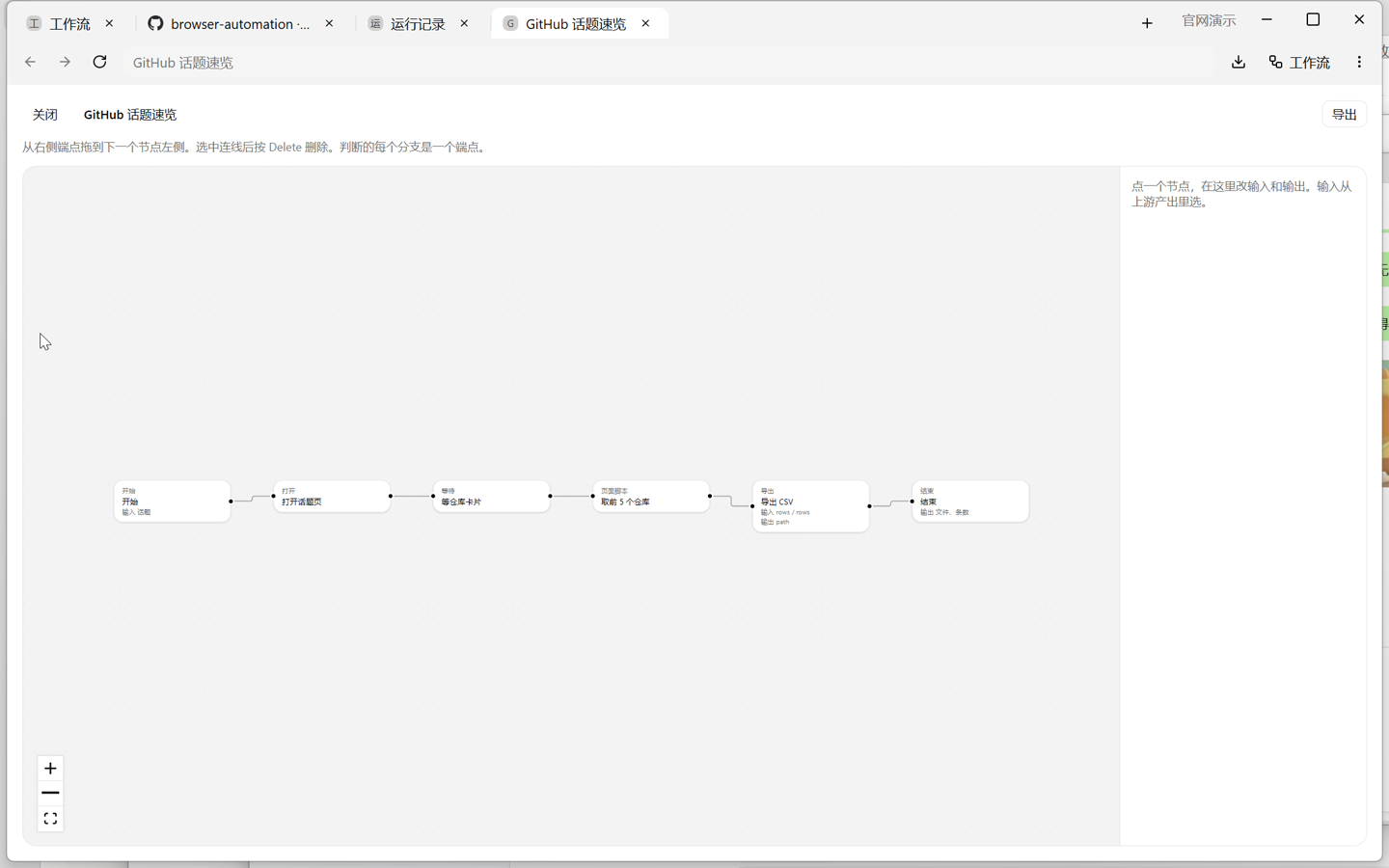
Workflow canvas

Workflow canvas

22 node types connected left to right; agents never draw, they call workflow_run.

BrowserPilot
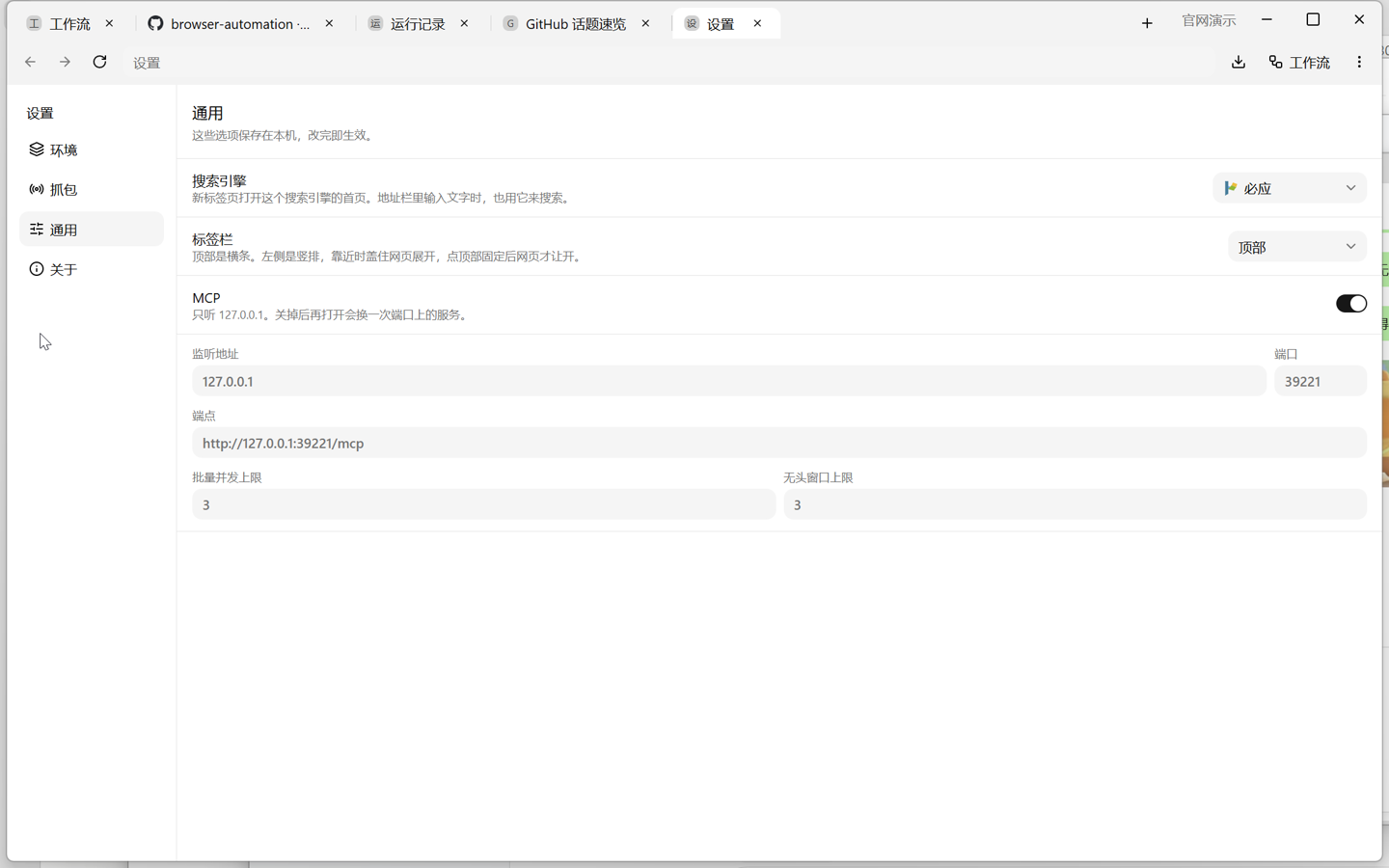
Settings, general

Settings, general

MCP listens on 127.0.0.1 only, port 39221 by default; batch concurrency and the headless limit live here.

09Source and build

Build and license

Main process, UI, Go CLI and the workflow market all live in public repositories. Three commands get a local build running.

Three commands

$ git clone https://github.com/xy200303/browserpilot
$ npm install
$ npm run dev

Install with npm install; build with npm run build; typecheck with npm run typecheck; package with npm run dist:win (or dist:mac, dist:linux).

License and boundaries

As of v0.19.0 the repository has no LICENSE file. The source is public, but until the author grants written permission, do not redistribute it as MIT or Apache. The actual repository file is authoritative.
10Changelog

The last three releases

Only commits that exist in the repository. Version numbers and dates follow the release tags.

v0.19.02026-11-09
  • Memory for 10 tabs is about 30% lower; background tabs sleep beyond 8 live tabs or under system memory pressure.
  • User data shrank from 501 MB to 254 MB after cleanup; screenshots keep 120 files, 80 MB and 14 days.
  • Screenshots and window preview no longer round-trip base64; capture is about 25% faster. Recording and media downloads stream to disk.
  • app.asar dropped from 14.2 MB to 4.5 MB.
v0.18.02026-11-08
  • Interface in Chinese and English: follow the system, or pin one language in settings.
  • All 99 tool descriptions rewritten in English and shortened; search gained aliases and a partial-match fallback.
  • Fixed main-process crashes when opening a bookmark, the page context menu or window preview after a view was recycled.
v0.17.12026-11-08
  • Tool descriptions are English-only and shorter, cutting the prompt footprint roughly in half.
  • Workflow recording: record a sequence of tool calls into a workflow graph.
  • Drawing strokes are verified by reading canvas pixels; wiped or empty strokes fail loudly.

Full history in GitHub Releases.

11FAQ

Frequently asked

Will it click a payment button by mistake?

There is no per-click confirmation: when the agent calls page_click, the click happens. Steps that need a human go through page_handoff or a handoff node, which removes the overlay, leaves a message and locks again only for the next step. For payment, delete or publish pages, put them after a handoff, or let the agent read only.

How are logins preserved? What about moving machines?

One environment is one Electron persist partition. Sign in once; closing the window keeps it, and environments never see each other. Deleting the environment clears cookies. To move machines, export and import cookies with env_export and env_import; the file is plain text, keep it local.

What happens when a site changes?

Selectors break and BrowserPilot does not repair them. A failure carries the match count, the text and a screenshot; re-locate with page_query or page_snapshot and update the workflow node. The run record shows which step stopped.

Can it run on a server?

No. It is a desktop app and needs a graphical session; headless only hides the window, still the same Chromium. MCP listens on 127.0.0.1 and is not exposed. For remote execution, connect to that machine over remote desktop.

Where do data and screenshots live?

In the user data directory: %APPDATA%\BrowserPilot on Windows, ~/Library/Application Support/BrowserPilot on macOS, ~/.config/BrowserPilot on Linux. Screenshots in screenshots, runs in runs.json, HAR in runs, exported CSV in exports, downloads in the download folder. There is no account and no cloud sync.

Which captchas are supported?

Geetest v4 sliders are automatic: cv, ddddocr and onnx with fallback, human-like drags and retries. Anything else is screenshotted for a vision agent through captcha_panel, with success depending on the puzzle and the model. Alphanumeric captchas work with ddddocr and local Python. Icon picking and board games have no detector; hand them to a human.

Can several accounts run at once?

Yes. One environment per account, each with its own window and logins. workflow_batch runs rows one at a time with up to 3 concurrent, and up to 3 headless windows by default, adjustable in settings.

Will sites detect it as a bot?

BrowserPilot removes the automation flags it would otherwise add: no --enable-automation, a Chrome user agent matching the bundled version, no Electron or HeadlessChrome string, and trusted CDP input by default. It is not an anti-detect browser and does not promise to bypass site risk controls; that judgement belongs to the site.

Install, connect your agent, let it run once

Open the app once after installing and confirm MCP is on in Settings; then register the local endpoint with Claude Code, Kimi Code, Cursor or your own client.

Source is public; no LICENSE in the repository yet · unsigned installers · © 2026 BrowserPilot
Recordings and screenshots come from real windows; the interface language can be switched in settings.

Source is public; no LICENSE in the repository yet · GitHub · Releases · Issues